Hallo Freunde der Sonne,
hier eine kurze Zusammenfassung um eine neue Instanz auf unserem Nagios4 (Core) anzulegen.
Nagios4 – Neue Instanz anlegen
Nagios-Komponenten
- Nagios-Core – /nagios/core
- Nagios-Globale-Definitionen – /nagios/instances/defaults
- Nagios-Instanz – /nagios/instances/<Instanz>
- Nagios-Webconf – /etc/httpd/conf.d/nagios/<instanz.conf>
- Nagios-Instanz-Dienst – /etc/systemd/system/<nagios-instance.service>
Neue Instanz anlegen
Einfach eine Kopie der Beispiel-Instanz anlegen:
cp -R /nagios/instances/sample /nagios/instances/customer
chown -R nagios:nagios /nagios/instances/customer
Bitte danach sicher gehen, dass alle symbolischen Links weiterhin vorhanden sind:
(bin / libexec / sbin sollten auf den Core zeigen – der wiederrum in die originale Installation weiterleitet)
ls -lh /nagios/instances/customer
Ergebnis sollte sein:
lrwxrwxrwx  1 nagios nagios   23 23. Dez 12:53 bin -> /nagios/core/nagios/bin
drwxr-xr-x  4 nagios nagios   115 23. Dez 12:53 etc
lrwxrwxrwx  1 nagios nagios   35 23. Dez 12:53 libexec -> /nagios/core/nagios-plugins/libexec
lrwxrwxrwx  1 nagios nagios   24 23. Dez 12:53 sbin -> /nagios/core/nagios/sbin
drwxr-xr-x  4 nagios nagios   90 23. Dez 12:53 var
Konfigurationsdateien der neuen Instanz überarbeiten
Für eine Grundeinrichtung der neuen Instanz müssen deren interne Pfade angepasst werden,
daher passt bitte folgende Dateien wie folgt an:
Webconfig – /nagios/instances/customer/share/config.inc.php
<?php
//


$cfg['cgi_config_file']='/nagios/instances/customer/etc/cgi.cfg';  // location of the CGI config file

$cfg['cgi_base_url']='/customer/cgi-bin';


// FILE LOCATION DEFAULTS
$cfg['main_config_file']='/nagios/instances/customer/etc/nagios.cfg';  // default location of the main Nagios config file
$cfg['status_file']='/nagios/instances/customer/var/status.dat'; // default location of Nagios status file
$cfg['state_retention_file']='/nagios/instances/customer/var/retention.dat'; // default location of Nagios retention file


// utilities
require_once(dirname(__FILE__).'/includes/utils.inc.php');

?>
CGI – /nagios/instances/customer/cgi.cfg
# MAIN CONFIGURATION FILE
# This tells the CGIs where to find your main configuration file.
# The CGIs will read the main and host config files for any other
# data they might need.

main_config_file=/nagios/instances/customer/etc/nagios.cfg


# PHYSICAL HTML PATH
# This is the path where the HTML files for Nagios reside.  This
# value is used to locate the logo images needed by the statusmap
# and statuswrl CGIs.

physical_html_path=/nagios/instances/customer/share


# URL HTML PATH
# This is the path portion of the URL that corresponds to the
# physical location of the Nagios HTML files (as defined above).
# This value is used by the CGIs to locate the online documentation
# and graphics.  If you access the Nagios pages with an URL like
# http://www.myhost.com/nagios, this value should be '/nagios'
# (without the quotes).

url_html_path=/customer

...
Nagios – /nagios/instances/customer/nagios.cfg
Wie in den oberen Beispielen muss „Customer“ gegen den neuen Instanz/Kundenamen ausgetauscht werden.
Ressourcen – /nagios/instances/customer/resource.cfg
Auch hier müssen die Pfade auf die neue Instanz angepasst werden:
# Sets $USER1$ to be the path to the plugins
$USER1$=/nagios/instances/customer/libexec

# Sets $USER2$ to be the path to event handlers
#$USER2$=/nagios/instances/customer/libexec/eventhandlers

# Store some usernames and passwords (hidden from the CGIs)
#$USER3$=someuser
#$USER4$=somepassword
Kontakte – /nagios/instances/customer/contacts.cfg
Hier müssen die Verbindungsdaten für den Kunden konfiguriert werden:
- Kunden bennen = blau
- Absender-Adresse für tagging des Ticketsystems = grün
###############################################################################
###############################################################################
#
# CONTACTS
#
###############################################################################
###############################################################################

# Just one contact defined by default - the Nagios admin (that's you)
# This contact definition inherits a lot of default values from the 'generic-contact'
# template which is defined elsewhere.

define contact{
        contact_name                    otrsconnector                   ; Weiterleitung ans Ticketsystem
        use                             generic-contact
        alias                           Weiterleitung OTRS PROLAN
        email                           nagios-connector@prolan.de
        host_notification_commands      notify-host-by-email-html
        service_notification_commands   notify-service-by-email-html
        _customer                       PROLAN Datensysteme GmbH
        _sender                         prolan@nagios.prolan-cloud.de

        host_notifications_enabled      1
        service_notifications_enabled   1
        host_notification_period        24x7
        service_notification_period     24x7
        host_notification_options       d,u
        service_notification_options    c,w,u
        }

define contact{
        contact_name                    nagiosadmin                     ; Eskalation an Admins
        use                             generic-contact
        alias                           Nagios Admin

        email                           kupke@prolan.de
        _customer                       PROLAN Datensysteme GmbH
        _sender                         prolan@nagios.prolan-cloud.de

        host_notification_commands      notify-host-by-email-html
        service_notification_commands   notify-service-by-email-html

        host_notifications_enabled      1
        service_notifications_enabled   1
        host_notification_period        24x7
        service_notification_period     24x7
        host_notification_options       d,u,r,f,s
        service_notification_options    c,w,u,r,f,s
        }

###############################################################################
###############################################################################
#
# CONTACT GROUPS
#
###############################################################################
###############################################################################

# We only have one contact in this simple configuration file, so there is
# no need to create more than one contact group.

define contactgroup{
        contactgroup_name       admins
        alias                   Nagios Ticketing
        members                 nagiosadmin
        }

define contactgroup{
        contactgroup_name       admins-ticket
        alias                   Weiterleitung OTRS
        members                 otrsconnector
        }
Neue Active-Directory-Gruppe für die Instanz-Zugriffe anlegen
Diese Gruppe wird später vom Webserver via LDAP abgefragt um herauszufinden ob ein Benutzer Zugriff auf die aktuelle Instanz hat.
Abbildung 1: Active Directory pdg.local\Nagios4\
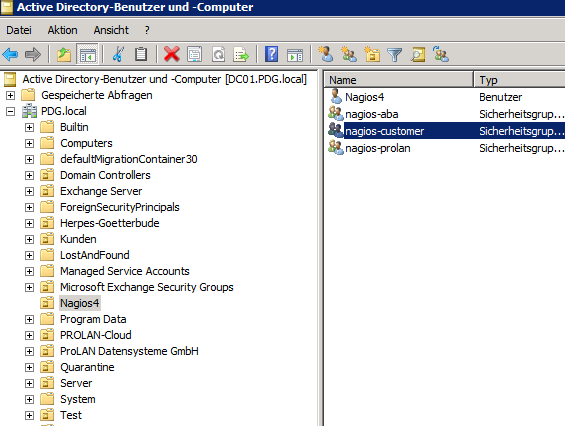
Im Schritt Neue Website anlegen dann blau gekennzeichnet.
Neue Website anlegen
Neue Instanz aus Vorlage kopieren:
cp /etc/httpd/conf.d/nagios/sample /etc/httpd/conf.d/nagios/customer.conf
Diese jetzt auf den Kundennamen und die neuen Pfade anpassen:
nano/etc/httpd/conf.d/nagios/customer.conf
Und hier muss Datei geändert werden (einfach Strg+W benutzen):
ScriptAlias /customer/cgi-bin "/nagios/instances/customer/sbin"

<Directory "/nagios/instances/customer/sbin">
   SetEnv NAGIOS_CGI_CONFIG /nagios/instances/customer/etc/cgi.cfg
   SSLRequireSSL
   Options ExecCGI
   AllowOverride None

   AuthType Basic
   AuthName "LDAP-Authentication PDG.LOCAL"
# 3268
   AuthBasicProvider ldap
   AuthLDAPURL "ldap://dc01.pdg.local:389/dc=pdg,dc=local?sAMAccountName?sub?(objectClass=*)"
   AuthLDAPBindDN "nagios4@PDG.LOCAL"
   AuthLDAPBindPassword "<entfernt>"

   require ldap-group cn=nagios-customer,ou=Nagios4,dc=pdg,dc=local


   <IfModule mod_authz_core.c>
      # Apache 2.4
      <RequireAll>
         Require all granted
         # Require local
         # Require valid-user
         require ldap-group cn=nagios-customer,ou=Nagios4,dc=pdg,dc=local
      </RequireAll>
   </IfModule>
   <IfModule !mod_authz_core.c>
      # Apache 2.2
      Order allow,deny
      Allow from all
      #  Order deny,allow
      #  Deny from all
      #  Allow from 127.0.0.1
      # Require valid-user
      require ldap-group cn=nagios-customer,ou=Nagios4,dc=pdg,dc=local
   </IfModule>
</Directory>

Alias /customer"/nagios/instances/customer/share"

<Directory "/nagios/instances/customer/share">
   SSLRequireSSL
   Options None
   AllowOverride None

   AuthType Basic
   AuthName "LDAP-Login PDG.LOCAL"
   AuthBasicProvider ldap
   AuthLDAPURL "ldap://dc01.pdg.local:389/dc=pdg,dc=local?sAMAccountName?sub?(objectClass=*)"
   AuthLDAPBindDN "nagios4@PDG.LOCAL"
   AuthLDAPBindPassword "<entfernt>"

   require ldap-group cn=nagios-customer,ou=Nagios4,dc=pdg,dc=local

   <IfModule mod_authz_core.c>
      # Apache 2.4
      <RequireAll>
         Require all granted
         # Require local
         # Require valid-user
         require ldap-group cn=nagios-customer,ou=Nagios4,dc=pdg,dc=local
      </RequireAll>
   </IfModule>
   <IfModule !mod_authz_core.c>
      # Apache 2.2
      Order allow,deny
      Allow from all
      #  Order deny,allow
      #  Deny from all
      #  Allow from 127.0.0.1
      # Require valid-user
      require ldap-group cn=nagios-customer,ou=Nagios4,dc=pdg,dc=local
   </IfModule>
</Directory>
Neuen Dienst anlegen
Zuerst muss eine Dienstbeschreibung angelegt werden:
nano /etc/systemd/system/nagios-customer.service
Danach bitte folgenden Aufbau angepasst einfügen:
[Unit]
Description=Nagios
# wait for Network and Webserver
After=network.target httpd.service

[Service]
Type=oneshot
ExecStart=/nagios/instances/customer/bin/nagios -d /nagios/instances/customer/etc/nagios.cfg
ExecStop=
RemainAfterExit=yes
User=nagios
Group=nagios

[Install]
WantedBy=multi-user.target
Danach den Dienst für den Autostart konfigurieren:
systemctl enable nagios-customer.service
Vor dem Start die Konfiguration des Nagios prüfen:
/nagios/instances/customer/bin/nagios -v /nagios/instances/customer/etc/nagios.cfg
Falls keine Fehler in der Konfiguration gefunden wurden kann nun der Dienst gestartet werden:
systemctl start nagios-customer.service
systemctl reload httpd